


Budget Car Rental
4.63.89K Reviews
App Specs
- Version
- 15.11
- Updated On
- License
- Free
- Downloads
- 1,000,000+
- Developer
- Avis Budget Car Rental LLC
- Categories
- Travel & Local
- Platform
- Android, iOS
Screenshots
 Analysis by AppCompare
I approach Budget Car Rental as a practical travel tool rather than a promise that every rental will be effortless. Its value is clearest when I already know roughly where and when I need a car, and want to compare available options without starting at a desk. The app is free, falls under travel and local services, and is made by Avis Budget Car Rental LLC. For a trip that depends on a rental, having the booking and reservation management together on my phone can make planning feel more manageable.
What I would check before booking
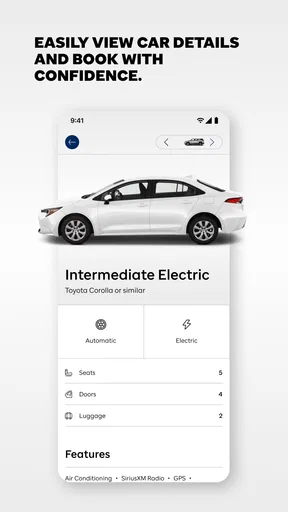
Before choosing a car, I would treat the app’s displayed price as a starting point, not the whole decision. I’d compare the available vehicle choices against the actual trip: how many people are travelling, how much luggage needs to fit, and whether the driving will mostly be in town or on longer roads. A cheaper option may be the sensible choice for a short solo visit, while a larger vehicle can be worth considering when comfort and luggage space matter more.
I’d also enter the pickup and return details carefully before comparing results. A change in timing or location can affect which options appear, so it is better to settle the likely itinerary first than to choose from a search that no longer matches the plan. If the trip is still uncertain, I’d check the reservation details before relying on any change being simple or cost-free; the app makes reservation management convenient, but the terms attached to a specific booking still matter.
Where the app is most useful
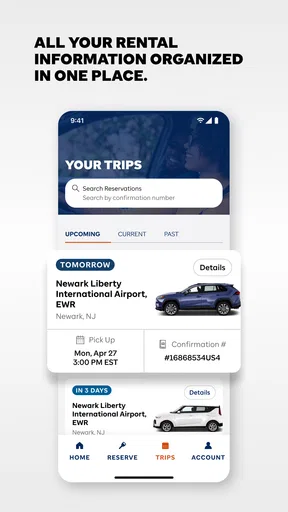
The strongest case for using this app is a trip where a car is part of the plan from the start: a weekend away, a visit to relatives outside a transit area, or a work trip with several stops. Searching by location and dates gives me a direct way to see what is available for that particular plan. The ability to manage a reservation from the phone is especially useful when an itinerary shifts and I need to check the booking without digging through paper or starting over.
For example, if I am travelling for a weekend and my return timing changes, I can open the reservation and look at the available management options rather than assume I must handle everything in person. I would still review any updated details before confirming a change. That habit is useful with any rental: a small adjustment to return time can have practical consequences, so convenience should not replace checking what the booking now says.
How it compares with other ways to rent
Compared with walking into a rental counter and beginning the search there, using the app lets me do more planning before I travel. That is helpful when I want to compare car types and prices in advance. A general travel comparison service may be a better starting point if my main goal is to look across several rental companies at once. This app makes more sense when I am considering Budget specifically or already have a Budget reservation to manage.
Public transport, rideshares, and taxis can be better alternatives for a city visit with limited driving. They avoid the work of collecting and returning a rental, and can suit a schedule centred on a few destinations. A rental becomes more compelling when stops are spread out, transit is inconvenient, or I want the flexibility to set my own route. I would not book a car just because the app makes the process accessible; I’d first ask whether having a car will genuinely improve the trip.
Worth Reading Before You Choose

EA SPORTS FC Mobile 26 Is a Bigger Football Game, but It Takes Time

Flipboard Shows What News Apps Must Do Beyond the Feed

Switching to Android Auto Means Rethinking Your Driving Routine

Google Calendar Makes a Crowded Week Easier to Manage

Ludo King Makes the Most of the Minutes Between Plans

Baby Panda World Brings Quick Play to Modern Phones, but Its Game Library Feels Busy
Small decisions that make the booking smoother
One useful habit is to compare the vehicle category with the trip’s hardest requirement, not just its average day. If I have bulky bags, several passengers, or a long drive, I would choose around those needs rather than focus only on the lowest displayed price. Conversely, for a short urban errand, a larger vehicle may add little value. This is a simple way to avoid paying attention to the wrong part of the choice.
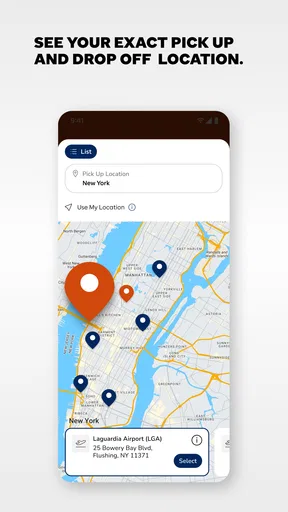
I’d also keep the pickup and return information easy to find on travel day and verify it before setting off. Map integration can help locate the rental location, but I would still check the address and allow time to get there. Notifications are useful prompts, not a substitute for reading reservation updates: if a message indicates a change, I’d open the booking and confirm the current details instead of relying on a phone alert alone.
Who should consider a different option
This is not the best fit for someone who wants to compare the entire rental market in one place, because its focus is Budget rather than every possible provider. It may also be unnecessary for travellers whose plans are well served by local transit or occasional rides. And if I need personal assistance for every step, I might prefer to speak with a rental representative directly; a mobile app is most helpful when I am comfortable checking details and handling routine tasks on my own.
My confidence in any rental also depends on the actual booking and pickup experience, not only the app interface. Vehicle availability and the condition of a car are tied to the rental itself, so I would inspect the vehicle and confirm the agreement at pickup as I would with any company. The app can make arranging and managing a reservation easier, but it cannot remove the need to review the practical details of the rental.
The app has an average rating of 4.5 from around 15,000 ratings, with roughly 3,800 written reviews and more than a million installs. It is free to download and rated for everyone. Its release goes back to 2012, and version 15.3 supports devices running Android 7.0 or later. Those figures make it an established option, but I would still judge it by whether Budget’s available cars and booking terms suit my specific journey.
So, I recently got my hands on the Budget Car Rental app, and let me tell you, it’s like having a rental car service right in your pocket. I decided to give it a try for my weekend getaway, and here’s my take on it.
First Impressions
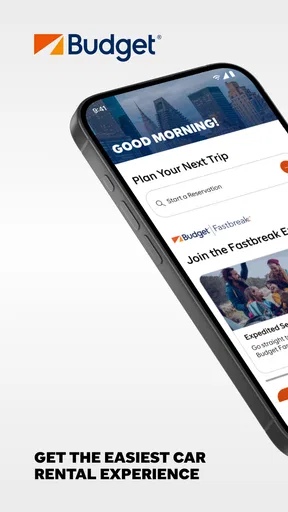
As soon as you open the app, you’re greeted with a sleek and intuitive interface. It’s like they knew I wanted to hit the road without a hassle. The design is clean, with everything you need right at your fingertips. Trust me, you won’t be spending ages trying to find what you need.
Booking Made Easy
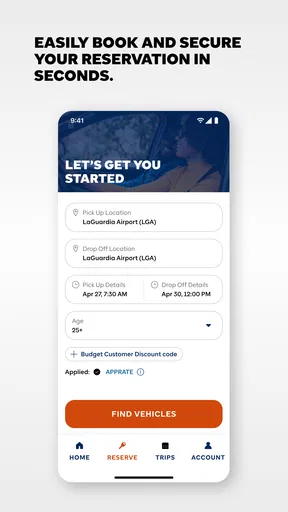
Let’s talk about the booking process. It’s super straightforward. You just pop in your location, pick-up, and drop-off dates, and voila—you’re presented with a list of available cars. The filtering options are pretty handy, allowing you to narrow down your choices based on car type or price range. The app even offers special deals, which is a nice touch if you’re looking to save a few bucks.
Variety of Options
The selection of cars was impressive. Whether you’re looking for a compact car for city drives or something more spacious for a family road trip, the app has you covered. I went for a mid-size sedan, and it was in great condition, just like they promised.
Features That Stand Out
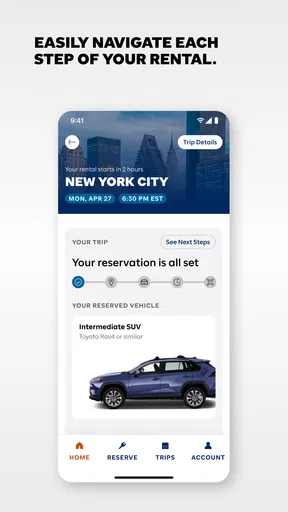
One of the features I found particularly nifty was the ability to manage reservations directly from the app. Need to extend your rental period? No problem. You can do it with just a few taps. The app also keeps you updated with notifications about your rental status and any upcoming changes. It’s like having a personal assistant for your car rental needs.
Customer Support
If you’re like me and sometimes need a bit of help, the app’s customer support is easily accessible. There’s an option to chat with a representative, and I found the response time to be pretty quick. It’s reassuring to know there’s someone ready to assist if anything goes awry.
User Experience
The overall user experience was seamless. The app didn’t crash or lag, which is a big plus in my book. I appreciate how user-friendly it is, making it perfect even for those who aren’t tech-savvy. Plus, the integration with map services made finding the rental location a breeze.
Why You Should Try It
In a nutshell, if you’re planning a trip and need a reliable car rental service, give the app a shot. It’s convenient, easy to use, and offers great value for money. Plus, with the added perks of managing everything from your phone, it’s never been easier to get on the road.
So there you have it. My journey with the app was smooth and hassle-free. If you’re looking for a rental service that’s both reliable and efficient, this app is definitely worth checking out.
Pros
- User-friendly interface for quick booking.
- Wide selection of vehicles available.
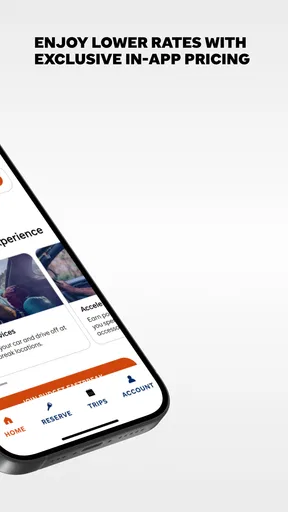
- Competitive pricing with frequent discounts.
- Easy modification and cancellation policies.
- Offers loyalty rewards for frequent users.
Cons
- Limited customer support hours.
- Additional fees for young drivers.
- Occasional discrepancies in car availability.
- Insurance options can be confusing.
- App requires frequent updates.
FAQs for Budget Car Rental
What features does the Budget Car Rental app offer?
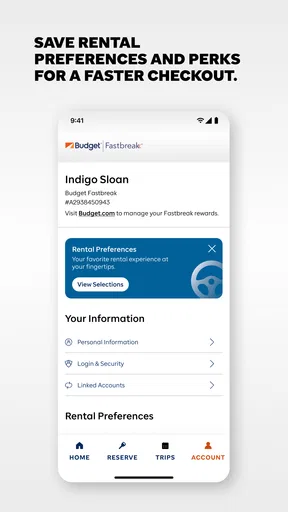
The Budget Car Rental app provides a seamless car rental experience with features such as easy booking, modifying or canceling reservations, locating Budget rental locations, and accessing exclusive deals. It also allows users to manage their Fastbreak profile, view past rentals, and get roadside assistance quickly, ensuring a hassle-free journey.
Is the Budget Car Rental app available for both Android and iOS?
Yes, the Budget Car Rental app is available for download on both Android and iOS platforms. Users can find it on the Google Play Store and Apple App Store, respectively. This ensures wide accessibility for smartphone users, allowing them to manage their car rentals conveniently from any device.
Can I use the app to find rental car locations nearby?
Absolutely, the app includes a location finder feature that helps users identify the nearest Budget rental locations. By enabling GPS on your device, the app can display nearby offices and provide directions, making it easy to pick up or drop off a rental car wherever you are.
How does the app handle payments and reservations?
The Budget Car Rental app allows users to make reservations and manage payments securely. You can enter your payment information directly into the app, ensuring a smooth booking process. Additionally, it offers flexibility to modify or cancel reservations, providing users with control over their rental plans.
Are there any exclusive deals or discounts available through the app?
Yes, the Budget Car Rental app often features exclusive deals and discounts for app users. By booking through the app, users can take advantage of special promotions and offers, which are updated regularly. It’s a great way to save money on your next car rental.


